Property research for roofing, solar, window and door leads. Highlight a full Florida address in your CRM, email or lead list. With WPPI running, press Ctrl + Alt + W on Windows. Review the available owner names, property type, year built and county-labeled values, then paste the copied summary into your CRM notes. No CRM switch required.
Available for Windows in early access. Intel Mac preview also available for macOS 14+. Mac requirements · Check county coverage. Available information and lookup time vary by county and property.
ACTUAL LOOK UP SPEED · FICTITIOUS PROPERTY INFORMATION · BUILT FOR SPEED
Highlight. Shortcut. Paste.
See property data move into CRM notes in the full, uncut 34-second Windows recording. Ctrl + Alt + W appears right after each address highlight.
Original recording speed; fictional property information. Clark Kent and Bruce Wayne replace customer details. Values are illustrative. Music is included. WPPI must be running; paste, review and save the copied notes yourself. Coverage and timing vary.
Fast electronic instrumental music plays throughout; there is no spoken dialogue. The top banner reads: Actual look up speed · Fictitious property information · Built for speed.
0:00 — Clark Kent’s fictional contact record is visible. The full address is highlighted. Ctrl + Alt + W appears immediately afterward.
0:06 — The copied Snapshot preview appears. The example displays $825,000, Apartment, 1938 and CLARK KENT.
0:09 — The copied example summary is pasted into editable notes.
0:14 — Bruce Wayne’s fictional contact record appears. The address is highlighted; Ctrl + Alt + W appears immediately afterward.
0:22 — The example Snapshot displays $137,000,000, Mansion, 1855 and BRUCE WAYNE.
0:25 — The second summary is pasted into editable notes. The recording finishes at 0:34.
Names, addresses, contact details, owner names, values, types and years were replaced for privacy. The superhero examples are fictional and do not establish New York or New Jersey coverage. Test supported addresses in your own Florida territory. Lookup time and available fields vary by county, property and connection.
NEW IN WPPI FOR WINDOWS
One shortcut. More time for your next lead.
Keep your focus where the conversation happens. Highlight a full property address in any app that supports normal text copying and press Ctrl + Alt + W. WPPI copies the address and researches in the background.
Highlight. Select a full address, including city and state or ZIP.
Shortcut. Press Ctrl + Alt + W once with WPPI running. A brief Snapshot preview appears when the result is copied.
Paste. Click editable CRM notes, press Ctrl + V, then review and save.
For Windows 10/11. The selected text must support normal copying. Supported county coverage, property matching and available fields apply; lookup time varies. WPPI does not automatically paste or save CRM records.
VETERAN-OWNEDOFFICIAL COUNTY SOURCESWINDOWS + MAC DESKTOP14 DAYS TO TRY IT YOURSELF
BUILT FOR THE PEOPLE QUALIFYING THE LEADS
Different counties. One property research app.
WPPI brings supported county property appraiser sources into one familiar workspace. Look up an address, review the available property facts and official record, then paste one automatically copied summary into your CRM. Less switching, less retyping, more time for your next conversation.
01 / KNOW
Get property context.
Review available owner names, county-labeled values, property type and year built together. WPPI opens the property's card on the official county property appraiser's site, so the source details are right there when you need them.
02 / KEEP MOVING
Stop retyping the same work.
The address stays selected. Bring WPPI forward using its Windows taskbar or Mac Dock icon and paste the next one. No extra click into the address field, Enter key or Search button.
03 / PUT IT TO WORK
Paste where you already work.
New Snapshot results copy automatically. Switch to your notes, email or CRM and paste. No new destination app to learn.
LESS BUSYWORK BETWEEN THE ADDRESS AND YOUR CRM
Spend your minutes with leads. See property facts in seconds.
Every county has its own search forms and route to the property card. Then come checking the facts, a separate Zillow listing-status lookup and copying the details into your CRM. WPPI brings available county facts together so you can spend less time assembling notes and more time in the conversation.
RESEARCHING BY HAND
Minutes of searching, checking and copying.
About 2–5 minutes to find and review a county record, in our founder’s manual workflow experience. Familiarity with the website and the county’s search steps affect the time. This is an experience-based estimate; a separate Zillow check and copying notes add their own steps.
Find the right county site and match the property.
Read the available owner, property type, year and county value.
Open Zillow separately if you need to check listing status.
Copy or type the needed facts into your CRM notes, field by field.
WITH WPPI
Watch property facts arrive in seconds.
Our real two-address demo shows available county facts arriving at normal lookup speed. The summary copies automatically, ready for you to paste into your CRM. Lookup time varies by county, property match and connection.
Paste the address to start a supported lookup.
Review the available county facts together and inspect the official record.
Review the separate, verified FOR SALE status when available.
Paste the automatically copied property summary into your CRM notes. Review it and save.
The Snapshot keeps the county’s labels with its property facts. On the current Windows app, a separately verified For Sale or foreclosure status may also appear as a plain Snapshot line; Sold stays in the upper-right indicator. The Intel Mac preview’s listing indicator stays separate from copied notes. WPPI is an independent CRM companion: you paste into your own notes field. Unavailable listing checks do not mean a property is off market.
See real county results arrive in seconds.
The demo shows two recorded Tampa public-building examples at normal lookup speed. Setup and idle pauses are cut. These examples are not a benchmark for every county or home; timing and available fields vary by county, property match and connection.
Make WPPI part of your sales day. Solo plans start at $29/month. Choose the plan for you or your team, and start with 14 days free.
Choose your WPPI plan →The trial needs no card and never starts a paid subscription automatically.
NEW IN WPPI FOR WINDOWS & MAC
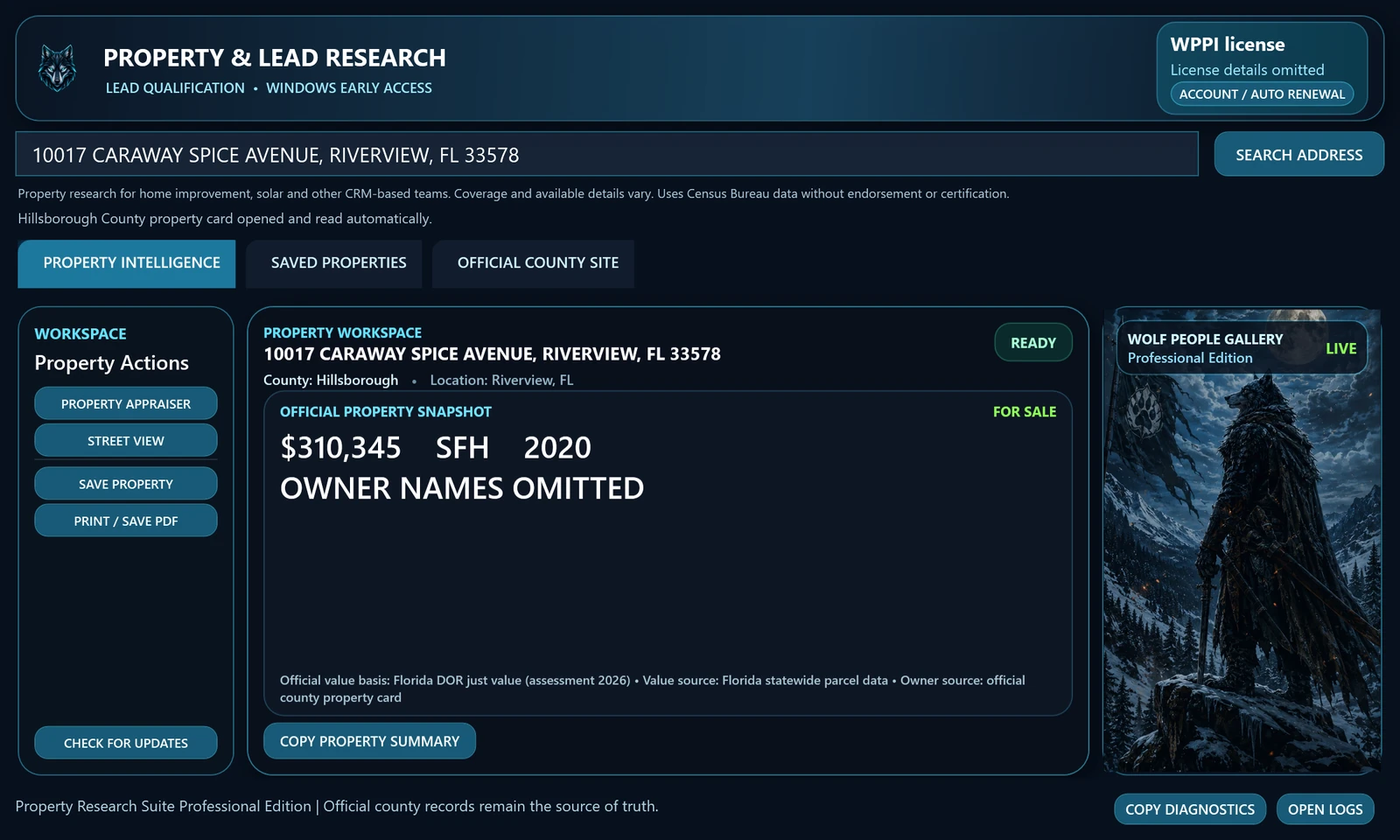
Listing status. A clean snapshot.
Review county value, property type, year and owners together. Windows may also copy a separately verified For Sale or foreclosure line; Sold stays in the upper-right indicator. The Mac preview keeps listing status separate from copied notes.
On Windows and the current Intel Mac preview, WPPI checks Zillow for the matched property. If the status cannot be verified, WPPI shows “Listing unavailable.” County values remain separate from asking prices.
Rendered Windows 144.0.0.38 example. Listing verified on 29 October 2026; owner details omitted.
GOT A NEED FOR SPEED?
Click. Paste. Keep the conversation moving.
WPPI removes steps between the address you have and the property information you need. Familiar shortcuts. Less back-and-forth.
Click the WPPI icon.
Click the Windows taskbar icon or Mac Dock icon. Your address field is selected and ready for the next paste.
Windows: Ctrl + V Mac: Command + V
Paste the address.
Lookup starts. WPPI opens the property's card on the county property appraiser's site; available Snapshot details copy automatically.
Windows: Ctrl + V Mac: Command + V
Paste the homeowner info.
Switch to a text field in your notes or CRM. Press Ctrl+V on Windows or Command+V on Mac to paste the automatically copied Snapshot.
On Mac, use Command+V to paste an address and click WPPI in the Dock to return. The demonstration above shows Windows.
BUILT FROM REAL APPOINTMENT-SETTING WORK
Made for the workflow. Not another workflow to learn.
Founder John Newman built WPPI around the county research he did while setting appointments for windows and doors. That firsthand frustration shaped a simple goal: spend less time gathering property context and more time using it.
For Florida roofing, solar, window and door sales teams. Check your counties, install WPPI, then compare three addresses with your usual research and note-taking. Review the available facts and official record before using them.
No email or card for the 14-day trial. Subscribe in the app only when you choose. Year built is the building year, not the roof age; county value is not a sale price or proof of a qualified lead.
Choose WPPI for your sales day. Plans from $29/month.
Put less searching and copying between your team and the next conversation. Choose a monthly plan for your daily property research. Start with 14 days free, then explicitly subscribe in the app when you’re ready. The trial needs no credit card and never charges automatically. Each additional computer needs its own activation.
Prices are USD monthly totals for each plan, before any applicable taxes. Enterprise seat count is confirmed at enrollment. Your free trial creates no paid subscription. To subscribe on Windows or the current Intel Mac preview, choose Subscribe / Sign in inside WPPI and explicitly choose a monthly subscription. Your computer is selected automatically. Subscribe or manage your account → · Billing and cancellation.
BEFORE YOU TRY IT
Questions before you choose WPPI.
Who is WPPI for?
WPPI helps people researching property-based leads: home improvement, solar, roofing, appointment setting and other teams that keep qualification notes in a CRM. Bring your own property address. Available county records add context; they do not determine a lead’s eligibility, purchase intent or consent to contact.
What does WPPI do?
WPPI is Windows and Mac homeowner lookup and property research software. Paste a supported address to start the lookup, review available owner and property details from official county sources, and paste the copied Snapshot into your notes or CRM.
Do I need a credit card for the trial?
No. Your first 14 days are free, with no credit card and no automatic charge at the end. On Windows or the current Intel Mac preview, download, install and open WPPI. Your 14-day trial starts automatically, with no email, Device ID or license file to enter. The current Intel Mac preview follows the same automatic-trial and in-app account connection flow.
What happens when I paste an address?
The selected address is replaced and lookup starts without pressing Enter or clicking Search. Available Snapshot results copy automatically. Lookup time and supported details vary by county, property match and internet connection.
Can I use WPPI alongside LeadPerfection or another CRM?
For teams using LeadPerfection, MarketSharp, improveit 360 or JobNimbus, WPPI provides a manual copy-and-paste property research workflow. Paste the newly verified Snapshot into an editable CRM notes field that accepts text, then review and save it. Permissions and formatting depend on your CRM setup. See the CRM property research workflow and test it with your own notes field during the free trial.
Which counties are included?
See the full coverage list, then try the addresses you work with. Available information and lookup steps vary by official source and property match.
Can I request coverage in another state?
Yes. Request your state and tell us what kind of team you work with. Requests help us prioritize expansion as we evaluate official county sources; they do not guarantee coverage or a release date.
Can I choose the normalized address instead of the full Snapshot?
On Windows, enable clipboard history before lookup and use Windows + V to choose the address or Snapshot. On Mac, use Copy normalized address from the Property menu when you need only the address.
Is WPPI a lead list or phone-number database?
No. You bring the property address. WPPI supports property research using county sources; it does not promise phone numbers, email addresses, contact consent, or a new list of sales leads.
Can I buy a subscription today?
Yes. Choose a monthly plan and sign in to your customer account, or choose Subscribe / Sign in inside WPPI for Windows or the current Intel Mac preview. The app connects this computer automatically. Stripe shows the price before payment. A subscription starts when you complete checkout and renews monthly until canceled; the free trial never charges automatically. Each additional computer requires its own activation within your plan’s capacity. Read the billing and cancellation terms.
Can WPPI tell me if a property is for sale?
On Windows and the current Intel Mac preview, WPPI checks Zillow for the matched property. A verified FOR SALE result appears in the upper-right corner, separate from the snapshot and copied summary. Unavailable checks are labeled; they do not establish that a property is off market. Listing status is separate from the county value.
Are the values sale prices or estimates of current market price?
Keep the county’s value label and year with the figure. An assessed, taxable or just/market value from a county record is not necessarily a listing price, recent sale price or current market appraisal. Review the official record for context.
Tell us your Florida counties, CRM and the research you repeat. Ask for help getting your first lookup working, or send a product or support question. We’ll reply by email. Please leave out customer addresses and records.
LESS RESEARCH. MORE CONVERSATIONS.
Put WPPI to work. Keep your sales day moving.
Bring available county property facts into the CRM you already use, with less searching and field-by-field copying. Plans start at $29/month.