FOR HOME IMPROVEMENT, SOLAR & CRM TEAMS
Home improvement lead qualification.
With a CRM companion.
WPPI is a CRM companion for home improvement, solar, roofing and appointment-setting teams. Research the Florida property address on an existing lead, review available county-record context and paste the summary into the notes your team already uses.
YOUR CRM. YOUR NEXT LEAD.
Less property research between you and the next call.
Two Florida addresses. Available county-record context. Copied notes. Watch the actual Windows workflow, then try WPPI with the addresses you already research.
Watch the 31-second demo → · Check my county coverage
Try WPPI free for 14 days →No card. No automatic charges. Public-building examples; available details and labels vary by county and property.
Start with the lead you already have
WPPI does not generate a lead list. You supply the address from your existing process. It helps you research supported property information so your notes are better prepared for the next conversation.
This is property research, not proof that someone is ready to buy. Owner records do not establish contact consent or a person’s current circumstances.
Keep qualification notes grounded
Owner names can help you compare the lead with the recorded property owner. Available property type and year-built details add building context. County valuations should retain their labels and years; they are not evidence of a prospect’s finances or a budget for home improvements.
Confirm important details with the prospect and the official record rather than treating a database field as the whole story.
Use the context for your kind of lead
For windows, doors, roofing and remodeling, available property type and building age can help you prepare questions. Solar teams can compare the lead with available recorded owner and property details before a conversation.
Confirm project requirements with the prospect. WPPI does not determine roof condition, solar suitability, energy use, financing eligibility, decision-making authority or permission to contact someone.
Remove the repetitive handoffs
Click the WPPI Windows taskbar icon or Mac Dock icon. Paste the address with Ctrl+V on Windows or Command+V on Mac and review the available result. A newly verified Snapshot copies automatically. Return to your notes or CRM and use the same paste shortcut. The previous address stays selected for your next property.
The Windows and Mac clipboard workflow uses editable text fields in your existing CRM or notes app. See the LeadPerfection and other CRM workflow below.
A property research companion for LeadPerfection and other CRM teams
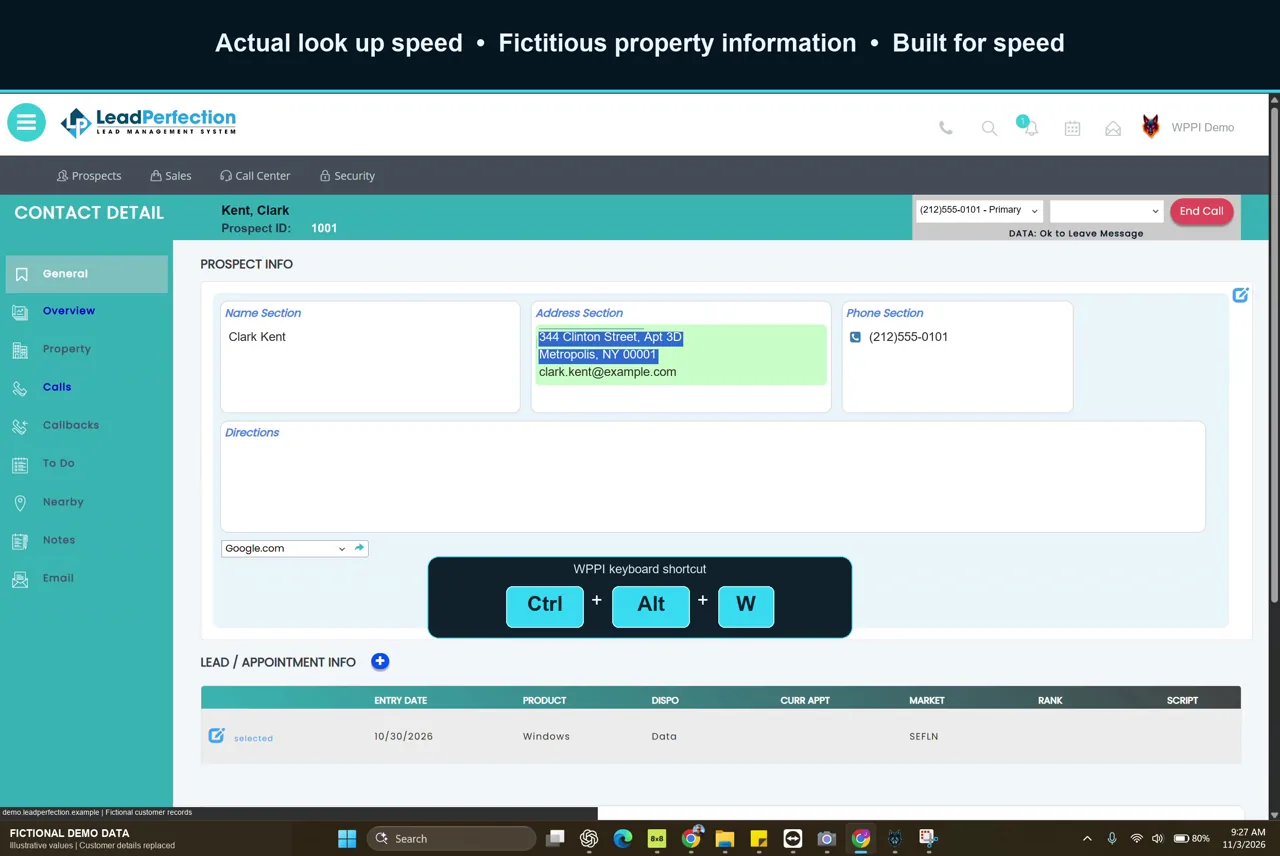
If your team manages leads in LeadPerfection, MarketSharp, improveit 360 or JobNimbus, keep the lead in your existing CRM and use WPPI to research its Florida property address. The handoff is an ordinary text paste into an editable notes field.
A LeadPerfection lead-to-notes workflow
- Copy the full property address, including any unit, from the lead you already have.
- Open WPPI from the Windows taskbar or Mac Dock. Paste with Ctrl+V on Windows or Command+V on Mac.
- Review the available county result and confirm the property match. Keep the official source and any missing or uncertain details with your notes.
- A newly verified Snapshot copies automatically. Return to the original CRM lead and paste into an editable notes field that accepts text.
- Review the formatting and save the note in your CRM. Add project questions using the CRM note template below.
Try this with your own notes field during the free trial. Editing permissions, text limits and formatting depend on your CRM setup. Test the paste, source details and save step before using the workflow across your team.
WPPI is independent of these vendors. CRM names identify example workflows and belong to their respective owners. This workflow uses manual copy and paste; WPPI does not sync CRM records through an API.
Property research questions for your trade
Windows and doors: prepare the right questions
Compare the lead address with the county record, including any unit. Review available property type and building year. Building age does not tell you when the current windows or doors were installed. Ask the prospect which openings need attention and what they want the project to achieve.
Roofing: separate building age from roof age
A year-built field describes the building, not necessarily its current roof. Use the county record to orient your notes, then confirm roof age, condition and project scope through your normal process. If permit history is needed, review the relevant official permit records separately; WPPI does not promise a roof-age or roof-condition result.
Solar: add context before a suitability check
Compare available recorded owner and property details with the lead. Ask about the roof, utility and electricity use as part of your separate qualification process. County records do not determine solar production, shading, roof suitability, financing eligibility or permission to contact the homeowner.
Use the Florida property appraiser record checklist to keep labels and record limits clear.
A CRM note template your team can reuse
Use these placeholders in a text field in your CRM. Fill them from the record you actually reviewed; leave unknown details blank. This template is a format, not a sample homeowner record.
- Property
- [Full address, unit and county]
- Recorded owner
- [Name exactly as the county shows it]
- Property context
- [Available property type and building year]
- Source and date checked
- [Official record reference and research date]
- Match or record limits
- [Missing fields, uncertain match or manual review needed]
- Questions for the conversation
- [Project details to confirm with the prospect]
WPPI automatically copies a newly verified property summary. Paste it into your CRM notes, retain the source context and add the questions your team needs. You paste into your existing CRM notes; WPPI does not sync CRM records. For the full sequence, see the address-to-CRM notes workflow.
Give a small trial a clear job
- Choose a handful of real addresses from your normal territory. Check county coverage and property limits first.
- Compare each matched record with the address and unit on the lead.
- Paste the result into the notes format your team already uses.
- Record where the workflow helps and which county lookups need extra steps.
- Decide from your own experience, not a promised sales-lift percentage.
Start without a billing commitment
Try WPPI for fourteen days with no credit card and no automatic charge. Solo, Pro, Business and Enterprise plan options are shown on the pricing section. Your first online open starts the trial on that computer; additional team computers need their own activation. Choose a monthly plan when you’re ready to continue. Sign in to subscribe or manage billing; review billing and cancellation. Your free trial never charges automatically.